
Summary
Gemini Code Assist is Google's AI coding assistant, sold in Standard and Enterprise editions and managed through Google Cloud. It pairs inline code completion and chat with an agent mode that plans and executes multi-step development tasks.
- Best for
- Teams standardized on VS Code or JetBrains who are already on Google Cloud
- Not for
- Individual developers who want a free tier, or anyone who needs a mature multi-file agentic workflow today rather than an Enterprise-only preview feature.
- From
- $22.80/month$22.80 monthly · $19 billed annually
- Free tier
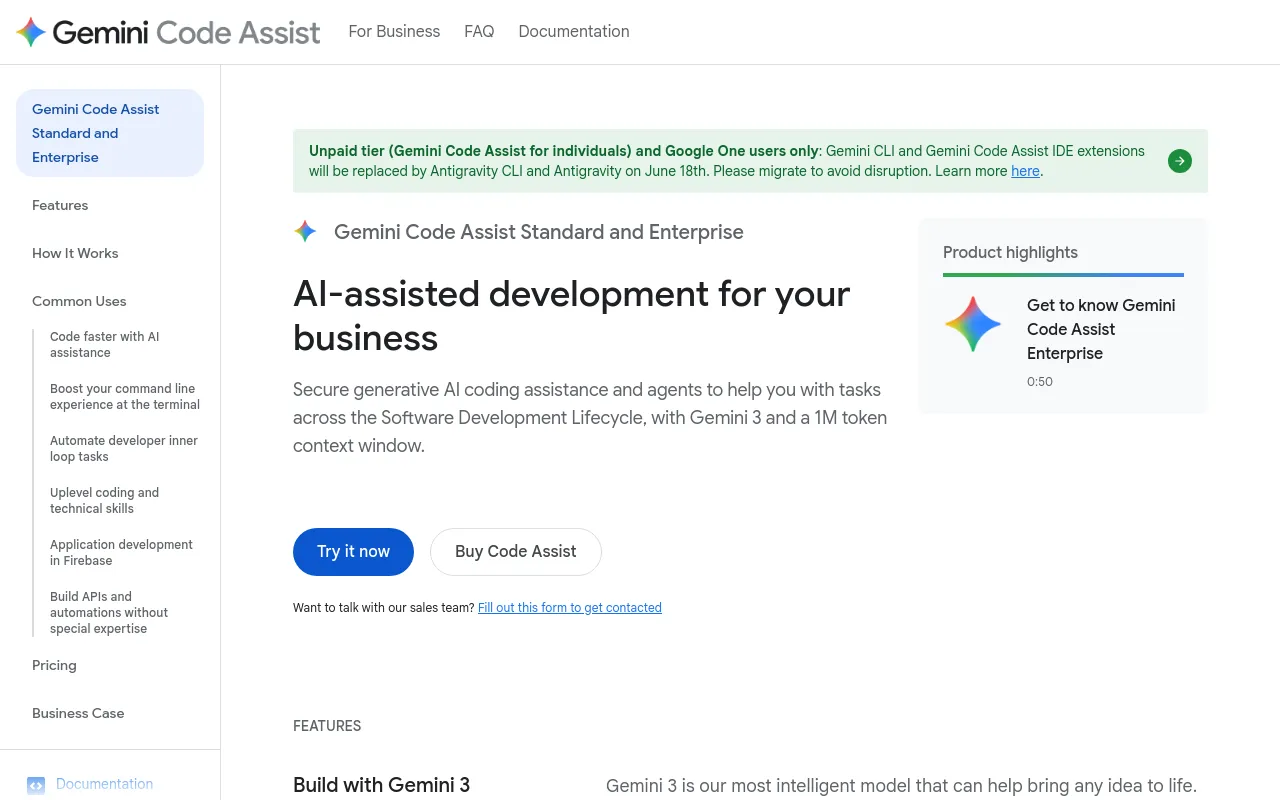
- NoNo unpaid Code Assist tier. Standard starts at $22.80 per user per month; the former Gemini Code Assist for individuals tier's IDE extensions and CLI were replaced by Antigravity on June 18th 2026.
What it does
- Writes code
- YesInline completion plus generation of whole blocks or functions from a comment or prompt, in VS Code, JetBrains IDEs, Cloud Workstations and Cloud Shell Editor.
Gemini Code Assist completes your code as you write, and generates whole code blocks or functions on demand.
codeassist.google/products/business - Debugs and fixes
- YesAgent mode and the Gemini CLI run a reason-and-act loop over local tools to diagnose and fix; the IDE chat is documented for debugging help.
The Gemini CLI uses a reason and act (ReAct) loop with your built-in tools and local or remote MCP servers to complete complex use cases like fixing…
docs.cloud.google.com/gemini/docs/codea… - Writes tests
- YesTest generation is one of the prebuilt smart actions in the IDE, and the overview lists unit-test generation as a chat capability.
Developers can use Gemini Code Assist's smart actions to automate frequent developer inner loop tasks such as test generation and code explanation.
codeassist.google/products/business - Reviews code
- YesA separate GitHub app reviews and summarises pull requests and answers follow-up questions via /gemini comments; files under .github/workflows are excluded.
Gemini Code Assist on GitHub uses a Gemini-powered agent that automatically summarizes pull requests and provides in-depth code reviews, speeding up…
docs.cloud.google.com/gemini/docs/code-… - Whole-codebase work
- YesLocal codebase awareness is quoted at a 1,000,000 token context window; Enterprise adds code customization indexed over private GitHub, GitLab and Bitbucket repositories.
Perform large-scale changes to your codebase, including adding new features, updating cross-file dependencies, helping with version upgrades,…
codeassist.google/products/business - Ships it
- PartlyOne documented deploy path: the /deploy slash command in VS Code agent mode, which needs Cloud Run enabled and the Cloud Run MCP server installed as a Gemini extension. Not supported in JetBrains IDEs.
Deploys a web application to Cloud Run. This Gemini CLI-based custom command uses the Cloud Run Model Context Protocol (MCP) server to build,…
docs.cloud.google.com/gemini/docs/codea…
How much it does unattended
- Runs autonomously
- YesOpt-in: yolo mode in VS Code (trusted workspaces only) and Auto-approve changes in JetBrains remove approvals. The default is to approve each plan and tool call.
Agent mode uses yolo mode, and won't ask for permission before taking actions when you send it a prompt.
docs.cloud.google.com/gemini/docs/codea… - Multi-agent
- NoThe vendor describes agent mode as one collaborative agent working with the developer; no orchestration of several agents on one task is documented.
A multi-step, collaborative, reasoning agent that expands the capabilities of simple command-response interactions inside Gemini Code Assist chat
cloud.google.com/products/gemini/pricing - Agent permissions
- YesPlans and tool calls are approved during execution; VS Code coreTools/excludeTools allow and deny lists reach individual shell commands. JetBrains offers approve or auto-approve only.
Control the agent behavior by commenting on, editing, and approving plans and tool use during execution.
docs.cloud.google.com/gemini/docs/codea…
Which models it runs on
- Claude
- NoGoogle's own Gemini models only; no third-party model is offered on any edition.
Gemini Code Assist uses large language models (LLMs) from Google.
codeassist.google/products/business - GPT
- NoGoogle's own Gemini models only; no OpenAI model is offered on any edition.
Gemini Code Assist uses large language models (LLMs) from Google.
codeassist.google/products/business - Open models
- NoNo open-weight model option; the service is bound to Google's hosted Gemini models.
Gemini Code Assist uses large language models (LLMs) from Google.
codeassist.google/products/business - Model choice
- NoYou do not choose a model vendor. An admin sets a project release channel, and that decides which Gemini models and features users get.
Users in your organization who use Gemini Code Assist in their local IDE can use features and models based on the release channel configured for the…
docs.cloud.google.com/gemini/docs/codea…
Where you use it
- In your editor
- YesFirst-party extensions for VS Code and JetBrains IDEs, plus Android Studio, Cloud Workstations and Cloud Shell Editor.
Code assistance is available in many popular IDEs, such as Visual Studio Code, JetBrains IDEs (IntelliJ, PyCharm, GoLand, WebStorm, and more), Cloud…
codeassist.google/products/business - On the command line
- YesGemini CLI is included with both editions and shares its daily request quota with IDE agent mode; it is preinstalled in Cloud Shell.
Gemini Code Assist gives you access to Gemini CLI, an open source AI agent that brings the power of Gemini directly into your terminal.
codeassist.google/products/business - In your pipeline
- YesActs on pull requests through the Gemini Code Assist on GitHub app, quoted at 100+ PR reviews per day; its enterprise version is in Preview. No other CI runner integration is documented.
Gemini Code Assist on GitHub brings the power of Gemini to the pull request process by acting as a code reviewer.
docs.cloud.google.com/gemini/docs/code-… - In a browser
- YesBrowser surfaces are the Google Cloud console Cloud Assist panel, Cloud Shell Editor and Cloud Workstations; there is no standalone hosted Code Assist web app.
requests that display responses in the Cloud Assist panel in the Google Cloud console and IDEs
docs.cloud.google.com/gemini/docs/quotas
Whose machine it runs on
- Self-hosted
- NoA managed multi-tenant Google Cloud service. You can add VPC Service Controls, Private Google Access, Cloud VPN or Interconnect, but not run the models yourself.
These LLM instances are shared by all Google customers who enable the Gemini for Google Cloud API Standard and Enterprise.
docs.cloud.google.com/gemini/docs/codea… - Open source
- PartlyThe CLI surface is open source; the Code Assist service, the IDE extensions and the models are proprietary.
The Gemini command line interface (CLI) is an open source AI agent that provides access to Gemini directly in your local or Cloud Shell terminal.
docs.cloud.google.com/gemini/docs/codea…
What it costs to run
- How it meters
- YesPer seat per month, monthly or 12-month commitment, billed monthly either way. Consumption is capped by per-user daily request quotas rather than charged.
Pricing is based on per user per month licenses, with monthly or annual commitment terms.
codeassist.google/products/business - Free tier
- NoSold only as Standard and Enterprise licences. The former unpaid individuals tier's IDE extensions and CLI were replaced by Antigravity, so there is no free way into Code Assist itself.
Unpaid tier (Gemini Code Assist for individuals) and Google One users only: Gemini CLI and Gemini Code Assist IDE extensions were replaced by…
codeassist.google/products/business - API access
- NoThe service endpoint is closed to customer code: cloudaicompanion.googleapis.com serves Google's own IDE and CLI clients, so you cannot drive Code Assist from your own stack.
Unlike most Google Cloud APIs, Gemini for Google Cloud API is an API that's developed for Google-provided clients only.
docs.cloud.google.com/gemini/docs/codea… - MCP server
- PartlyCode Assist is an MCP client, not an MCP server: agent mode connects to local and remote MCP servers in both VS Code and JetBrains, but nothing exposes Code Assist for another agent to query.
Configure MCP servers to extend the agent's abilities.
docs.cloud.google.com/gemini/docs/codea… - Bring your own key
- PartlyYour key is an overflow path, not the billing model: once the daily agent quota is spent you can set geminicodeassist.geminiApiKey to a Gemini or Vertex AI key. Inference stays on Google.
If you've exhausted your daily quota for Gemini Code Assist agent mode, you can continue to use the service by providing an API key. You can use…
docs.cloud.google.com/gemini/docs/codea…
Buying it for a team
- A company can buy it
- YesBought against a Cloud Billing account from the Admin for Gemini console, or by custom quote; licences are then assigned to users in the organisation.
You can purchase your licenses directly from the Gemini Admin console, or connect with our sales team to get a custom quote for your organization.
cloud.google.com/products/gemini/pricing - Seat model
- YesPer-user licences with a 10-licence floor on Enterprise and none stated on Standard; no ceiling. Licences self-assign on first IDE use and a licence idle 30 days is reassigned.
Note that if you are purchasing Enterprise edition, then you must purchase at least 10 licenses.
docs.cloud.google.com/gemini/docs/codea… - Pooled budget
- NoEach licensed user gets their own allowance, not a shared pool: 2 requests/second, 6000 code requests/day, and 1500 (Standard) or 2000 (Enterprise) agent-mode plus CLI requests per user per day.
Gemini for Google Cloud enforces quotas for the total number of requests per day for each user in a project.
docs.cloud.google.com/gemini/docs/quotas - Admin controls
- PartlyAdmins gate access with IAM roles, set the project release channel and manage GitHub review config across repositories, but the agent's own tool allow/deny lists live in each developer's settings.json.
You can use Identity and Access Management (IAM) to control application developer access to Gemini Code Assist Standard or Enterprise.
docs.cloud.google.com/gemini/docs/codea… - Audit log
- YesCloud Audit Logs under serviceName cloudaicompanion.googleapis.com, split into Admin Activity and Data Access entries; code completion and generation calls are themselves audited.
Google Cloud services generate audit logs that record administrative and access activities within your Google Cloud resources.
docs.cloud.google.com/gemini/docs/audit… - Single sign-on
- YesIdentity comes from Cloud Identity or Google Workspace, or an external IdP federated into them, and Google's own guidance is to enable single sign-on. Neither SAML nor OIDC is named on the page.
You must set up each developer with a user account that is managed by Cloud Identity, Google Workspace, or an identity provider that you've federated…
docs.cloud.google.com/gemini/docs/codea…
What happens to your code
- Opt out of training
- YesNothing to opt out of: no training on prompts or responses by default. Preview and Trusted Tester data sharing is opt-in and used for product improvement, not training.
Gemini doesn't use your prompts or its responses as data to train its models.
docs.cloud.google.com/gemini/docs/disco… - Data residency
- NoNo residency choice or commitment for Code Assist processing; separately, the Developer Connect link used by the GitHub reviewer is always created in us-east1.
Typically, processing occurs at the data center that is closest to the request's geographic origin, but regionality is not guaranteed.
docs.cloud.google.com/gemini/docs/codea… - Getting out
- PartlyThere is nothing vendor-side to export, because prompts and responses are not stored; if you want a record you route it to your own Cloud Logging bucket. Licences are seats, so no credits expire.
Because Gemini Code Assist Standard and Enterprise are stateless Google Cloud services, they don't store prompts and responses in Google Cloud.
docs.cloud.google.com/gemini/docs/codea… - Certifications
- YesSOC 1, SOC 2 and SOC 3 plus ISO/IEC 27001, 27017, 27018 and 27701, listed for both editions. GDPR is not claimed as a certification; data handling sits under the Cloud Data Processing Addendum.
Gemini Code Assist has achieved multiple industry certifications such as SOC 1/2/3, ISO/IEC 27001 (Information Security Management), 27017 (Cloud…
codeassist.google/products/business
Checked · How we check
Alternatives
GitHub's AI coding assistant and cloud agent, from editor completions to pull-request review.
Coding agent in a desktop editor, terminal CLI, cloud VMs and CI, priced per seat plus token usage.
Agentic coding tool from Anthropic that edits your codebase, runs commands, and opens pull requests.
Google's terminal agent: a keyboard-driven TUI that edits code, spawns subagents and gates every tool call.
Filed under
Sources and updates
Sources16
- codeassist.google/products/business
- docs.cloud.google.com/gemini/docs/codeassist/security-privacy-complianceIndependent source
- docs.cloud.google.com/gemini/docs/codeassist/use-agentic-chat-pair-programmerIndependent source
- docs.cloud.google.com/gemini/docs/quotasIndependent source
- docs.cloud.google.com/gemini/docs/code-review/review-repo-codeIndependent source
- docs.cloud.google.com/gemini/docs/codeassist/agent-modeIndependent source
- docs.cloud.google.com/gemini/docs/codeassist/configure-release-channelsIndependent source
- docs.cloud.google.com/gemini/docs/codeassist/gemini-cliIndependent source
- cloud.google.com/products/gemini/pricingIndependent source
- geminicli.com/docs/reference/toolsIndependent source
- geminicli.com/docs/resources/quota-and-pricingIndependent source
- docs.cloud.google.com/gemini/docs/adminIndependent source
- docs.cloud.google.com/gemini/docs/audit-loggingIndependent source
- docs.cloud.google.com/gemini/docs/codeassist/overviewIndependent source
- docs.cloud.google.com/gemini/docs/codeassist/set-up-geminiIndependent source
- docs.cloud.google.com/gemini/docs/discover/data-governanceIndependent source
Coverage elsewhere3
Updates4
- Capabilities · Free tier · Price · Terms
- Capabilities · Free tier · Price · Terms
- Alternatives · Documentation link
- Created · Summary · Tagline