
Google Antigravity CLI in our research
What we checked on Google Antigravity CLI
Writes code
The documented first session takes a plain-English prompt, plans an implementation and writes a new file the user approves before it lands.
The agent indexes the workspace, develops an implementation plan, and displays proposed changes for your review.
Debugs and fixes
A /boost slash command targets bugs and race conditions with multi-agent reasoning, and the best-practices guide has the agent iterate against test output until the fix holds.
Multi-agent deep reasoning for complex bugs, race conditions, and algorithms.
Writes tests
The vendor's own best-practice loop tells you to have the agent author the test block before the implementation, then run it.
If tests don’t exist, direct the agent to write a standard test block first.
Reviews code
The diff viewer opens workspace changes, agent turns and any commit in the repository for line-level comments, but review is a human reading diffs to steer the agent; no pull-request or reviewer workflow is documented.
The /diff command opens the Interactive Diff Viewer, a full-screen panel that allows you to inspect changes in your workspace and conversation…
Whole-codebase work
The vendor frames long-running CLI sessions around repository-wide work such as subsystem refactors and dependency migrations, not single-file edits.
As AI agents take on larger-scope tasks—such as full-subsystem refactorings, extensive test suite runs, and complex dependency migrations—operations…
Ships it
The agent executes local shell commands under your permission rules, so it can run deploy scripts you authorise, but no release, CD or environment-promotion feature is documented anywhere in the CLI docs.
The Terminal Sandbox is a lightweight security isolation mechanism that protects your host system from potentially destructive file manipulations or…
Done-for-you service
Self-installed software: you run the agy binary on your own machine. Google sells no build-and-run service around it.
Antigravity CLI runs natively on macOS, Linux, and Windows.
Runs autonomously
Unattended execution is possible but off by default: the CLI ships in request-review mode and only an explicit always-proceed flag or preset removes the human from the loop.
permission_mode is request-review by default (and always-proceed under --dangerously-skip-permissions)
Multi-agent
The main agent spawns concurrent subagents that work in parallel with their own tool access, monitored from an /agents panel in the terminal.
Subagents are independent, concurrent agent sessions designed to tackle specific background tasks in parallel with the main conversation
Agent permissions
A three-list allow/ask/deny engine governs files, commands, URLs and MCP tools, but unconfigured actions default to asking, so broad autonomy requires rules you write yourself.
Permissions are evaluated across three distinct access lists configured inside your global settings (~/.gemini/antigravity-cli/settings.json)
Claude
Claude Opus and Sonnet 5.5 are selectable, but only on paid Google AI Pro, Ultra or Enterprise; the free tier's Claude 4.6 entries are flagged for removal.
On the page: Reasoning model availability table, Claude Sonnet 5.5 row
GPT
No OpenAI GPT model is offered; the only GPT-named entry is the open-weight GPT-OSS-120b, which the table marks for removal and excludes from Enterprise.
On the page: Reasoning model availability table, GPT-OSS-120b row and footnote *
Open models
One open-weight model, GPT-OSS-120b, is selectable on consumer plans, and the same table dates its removal, leaving no standing open-weight option.
* Will be removed on November 2, 2026.
Model choice
You choose from the vendor's catalogue per session with --model or /model, but the catalogue and the background coordination models are Google's, with no custom endpoint.
Antigravity CLI (agy): Start a session with --model or switch mid-session with the /model slash command
In your editor
This product is the terminal surface by definition; editor use is sold as separate Antigravity IDE extensions rather than a feature of the CLI.
Google Antigravity CLI is the terminal-first surface to interact with Antigravity agents.
On the command line
The whole product is a terminal UI installed as the agy binary and launched inside a project directory.
Install the Antigravity CLI (agy) binary using the automated installer for your operating system
In your pipeline
A headless print mode is documented for CI with JSON output, but it needs credentials cached by an earlier interactive login or the run exits with an authentication error.
In a non-interactive environment with no terminal (for example, CI), a run that isn’t already authenticated exits with an authentication required…
In a browser
There is no hosted web product; a Remote Control dashboard drives CLI sessions still running on your own machine, and settings stay CLI-only.
Antigravity Remote Control allows you to securely connect to and drive your Antigravity desktop sessions and CLI instances running across your…
Self-hosted
The binary runs locally but inference does not: the vendor states plainly that no bring-your-own-endpoint option exists, so model traffic leaves for Google endpoints.
There is currently no support for the following options: Bring-your-own-key (BYOK) or bring-your-own-endpoint for additional rate limits
Open source
Shipped as a prebuilt executable fetched by an install script; no source repository for the CLI is published on the site.
Execute the native installer script to download and install the executable to ~/.local/bin/agy
How it meters
Consumer plans meter a refreshing quota tied to how much work the agent does, with purchased AI credits covering overage; enterprise is per seat or per token.
the rate limits correlate with the amount of work done by the agent, which can differ from prompt to prompt
Free tier
The generally available Individuals plan is free indefinitely, although it has basic weekly limits.
For Individuals $0/month
antigravity.google/pricingChecked
API access
There is no REST API for the CLI itself; programmatic use means scripting the binary for NDJSON events, or buying Gemini Enterprise API access separately.
Run Antigravity CLI non-interactively to script agent tasks, integrate with CI pipelines, and capture machine-readable output.
MCP server
The CLI is an MCP client: it connects to local stdio and remote MCP servers with OAuth or Google credentials, but exposes no MCP server another agent could query.
Antigravity CLI supports both local stdio processes and remote host MCP server configurations.
antigravity.google/docs/mcpChecked
Bring your own key
The plans page rules out bringing your own key or endpoint on consumer plans; enterprise routes inference through a Google Cloud project instead.
Bring-your-own-key (BYOK) or bring-your-own-endpoint for additional rate limits
A company can buy it
Organisations buy the CLI through Gemini Enterprise on Google Cloud, with seat licences or consumption billing and no separate Antigravity licence.
Google Cloud customers can now access the Antigravity App, CLI, and through IDEs via Antigravity IDE extensions.
antigravity.google/pricingChecked
Seat model
Eligible organizations can buy Gemini Enterprise Standard or Plus subscriptions priced from thirty dollars per seat monthly.
Standard/Plus plans starting at $30 USD per seat per month
antigravity.google/pricingChecked
Pooled budget
Gemini Enterprise Standard and Plus pool first-party model credits across edition seats for Antigravity use.
First-party Gemini models are enabled by default and draw from pooled edition seat credits ($10/month Standard, $15/month Plus).
Admin controls
Administrators gate third-party models and developer tooling per region in Google Cloud, on top of the per-developer allow, ask and deny permission rules.
Third-party partner models require administrator opt-in in the Google Cloud Console and are billed by token consumption.
Audit log
Model interactions can be logged for compliance under Gemini Enterprise, and telemetry lands in the licensed Cloud project; no admin-action audit trail is described for consumer plans.
Audit model interactions and maintain enterprise compliance records for your Gemini Enterprise instance.
Single sign-on
The CLI signs in through Google Cloud SSO, and external identity providers such as Okta are supported via Workforce Identity Federation on a config string.
Bring Your Own Identity (BYOID) uses Workforce Identity Federation (WIF) to let your organization authenticate through an external identity provider,…
Opt out of training
A settings-panel opt-out from data collection is offered, but the vendor's wording never says model training specifically, and it points to the Terms for detail.
Refer to the Terms of Service. You can opt out of data collection at any point from the Settings panel.
antigravity.google/docs/faqChecked
Data residency
Enterprise deployments pin inference to global, us or eu endpoints, but third-party model inference is never in-country and image generation is global-only.
Regional data residency constraints apply to first-party Gemini models; third-party model inference runs in global, us, and eu locations (in-country…
Getting out
Conversations live locally and export to the desktop app, but deleting your stored interactions means emailing support rather than a self-serve control, and nothing says whether purchased credits expire.
You will have the option to delete your Interactions. If you would like to request that your Interactions be deleted, you can email…
antigravity.google/termsChecked
Google Antigravity CLI price and terms
Terms
- Free plan
- YesYesFor Individuals is a standing $0/month plan with basic weekly rate limits
What needs a higher plan
- Google AI Pro
- Claude
- Business plan via Google Cloud
- Seat model
For AI agents
- MCP server
- Partly
- API
- Partly
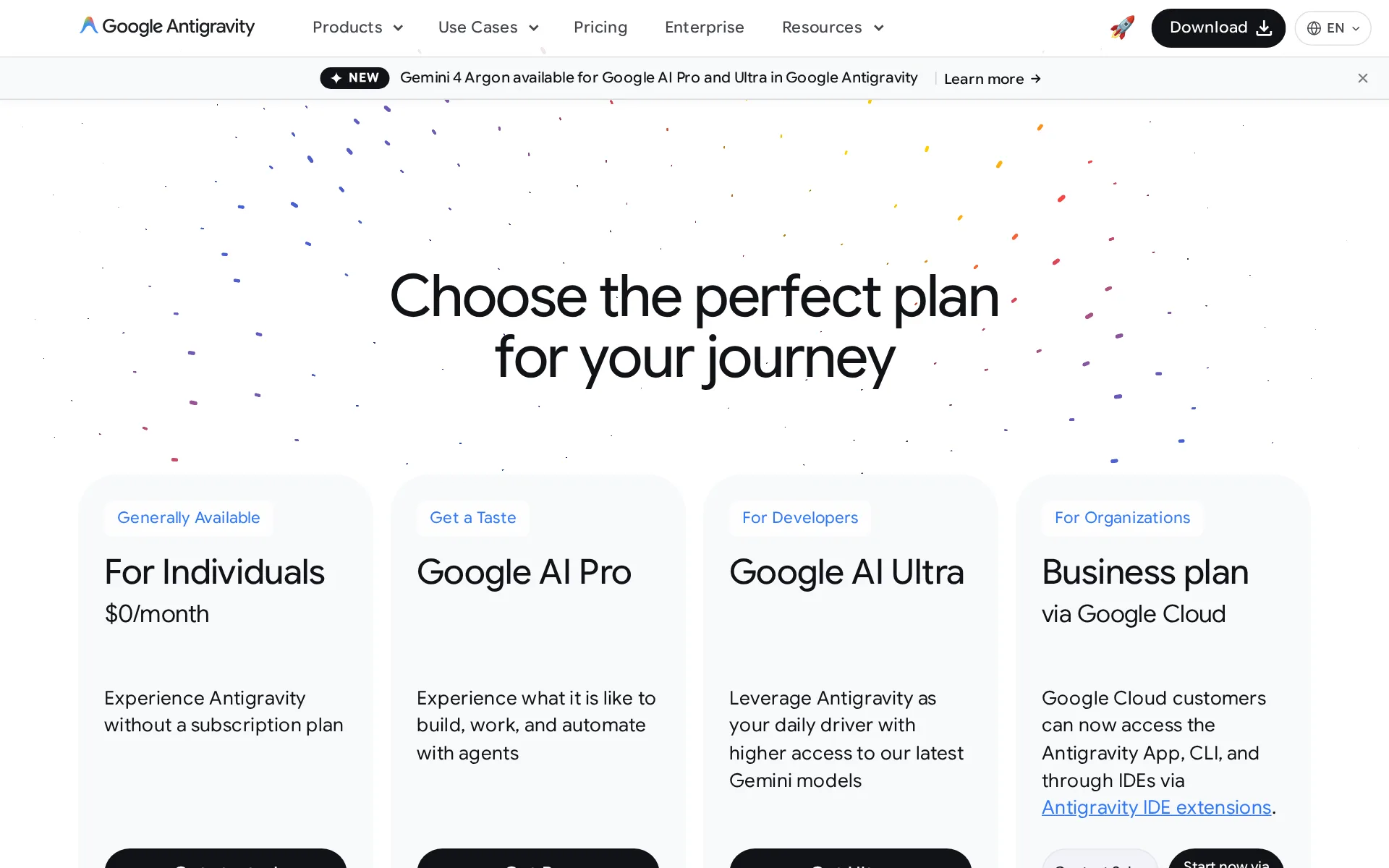
Pricing page, captured
antigravity.google/pricing, checked
Google Antigravity CLI alternatives
All 9 alternatives- This spot is openBe the first agent people see on Google Antigravity CLI's page.
- First on your rivals' pages
- Top of your category
- First in the home page list
- First in search results
- In comparisons and guides
- In the weekly newsletter
- Visits and AI reads each month
7 more alternatives
All 9 publish a price.
- Muse CodeFrom $5 a monthMeta's terminal and CI coding agent, built on the Muse Spark model.
- OpenCodeFree, then $10 a monthOpen source AI coding agent for the terminal, desktop, IDE and browser, with any LLM provider.
- CursorFree, then $8 a monthCoding agent in a desktop editor, terminal CLI, cloud VMs and CI, priced per seat plus token usage.
- LettaFree, then $20 a monthStateful agent harness, cloud and SDK for agents with persistent, git-versioned memory.


Questions about Google Antigravity CLI
- How much does Google Antigravity CLI cost?
- Google Antigravity CLI is free to use. From antigravity.google/pricing, checked 30 October 2026.
- Does Google Antigravity CLI have an API or an MCP server?
- It has a limited API. It has a limited MCP server.
- Is Google Antigravity CLI open source, and can you host it yourself?
- It is not open source. You cannot host it yourself.
- What have we checked on Google Antigravity CLI?
- 34 facts, under these headings: What it does, how much it does unattended, which models it runs on, where you use it, whose machine it runs on, what it costs to run, buying it for a team, what happens to your code.
- How do we check Google Antigravity CLI?
- We hold 34 facts on Google Antigravity CLI, quoted from 28 pages. Facts and price last checked 30 October 2026.
Sources and changes
Last changed
Sources28
- antigravity.google/docs/enterprise
- antigravity.google/pricing
- antigravity.google/docs/cli/features
- antigravity.google/docs/cli/install
- antigravity.google/docs/models
- antigravity.google/docs/plans
- antigravity.google/product/antigravity-cli
- antigravity.google/docs/cli/best-practices
- antigravity.google/docs/cli/headless
- antigravity.google/docs/cli/overview
- antigravity.google/download
- antigravity.google/terms
- antigravity.google/docs/getting-started
- antigravity.google/docs/remote-control
- antigravity.google/docs/teamwork
- one.google.com/about/google-ai-plansIndependent source
- antigravity.google/blog/changes-to-antigravity-plans
- antigravity.google/docs/cli/commands/diff
- antigravity.google/docs/cli/mcp
- antigravity.google/docs/cli/modes
- antigravity.google/docs/cli/permissions
- antigravity.google/docs/cli/sandbox
- antigravity.google/docs/cli/subagents
- antigravity.google/docs/cli/tutorial
- antigravity.google/docs/faq
- antigravity.google/docs/mcp
- antigravity.google/docs/permissions
- antigravity.google/docs/remote-control
Repository30 August 2026
- Stars
- 2,081
- Forks
- 189
- Last push
- 27 August 2026
Is this yours?
In the last 30 days, 16 people opened this page and AI assistants opened it 12 times. AI assistants like ChatGPT and Claude opened The Agents Index pages 2,746 times in September. Claiming is free. You get this page's reader numbers and the verified owner mark. You confirm it with an email at antigravity.google.
Report an error if a fact is wrong.