
Not for Teams that need a programmatic API to drive builds from their own code, or buyers who want assurance of responsive customer support before paying, given the vendor's current 1.5/5 Trustpilot record.
Changed since our last check
- Open models: now Partly. It was No when we checked on .
- Model choice: now Partly. It was No when we checked on .
- In your editor: now No. It was Partly when we checked on .
- MCP server: now No. It was Partly when we checked on .
- Admin controls: now Yes. It was Partly when we checked on .
- Opt out of training: now Yes. It was Partly when we checked on .
- Getting out: now Yes. It was Partly when we checked on .
- Certifications: now Partly. It was Yes when we checked on .
The facts, with their sources
What it does
- Writes code
- YesAuthoring new projects from a plain-language prompt is the core product: you describe an app and Bolt generates the code, with no local setup.
Bolt is an AI app builder that turns natural language prompts into a working web or mobile app.
support.bolt.new/llms.txt - Debugs and fixes
- YesBolt iterates on its own output to remove errors, and the paid security audit diagnoses issues and applies the fixes itself rather than only reporting them.
Bolt automatically tests, refactors, and iterates to reduce errors — so you can stay focused on building.
bolt.new - Reviews code
- PartlyBolt reviews the code and database of your own project in a security audit and fixes most findings, but that audit needs a paid plan and there is no review of a pull request someone else wrote.
Project security audit: Reviews your whole project, including your code and database, fixes what it can, and flags anything you need to handle.…
support.bolt.new/building/security.md - Whole-codebase work
- PartlyThe Max agent is the one aimed at large codebases and refactors, and Max is withheld from the free plan, so carrying work across a big project is a paid-tier capability.
Max thinks more about each step, which makes a difference when the task involves working through large codebases with complex dependencies or solving…
support.bolt.new/building/agents.md - Ships it
- YesBolt does not stop at the diff: one Publish click deploys the project to a live bolt.host address, and paid plans add custom domains and private publishing.
Bolt offers built-in hosting, so you can publish your Bolt project for free at a web address ending in bolt.host. You don't need to set up a separate…
support.bolt.new/bolt-cloud/hosting/pub… - Done-for-you service
- NoThis is self-serve software you operate yourself; Enterprise adds onboarding, workshops and a success manager but no team that builds the product for you.
No. Bolt is a browser-based tool. Sign up at bolt.new and start building right away. No setup or installation is required
support.bolt.new/concepts/faq
How much it does unattended
- Runs autonomously
- PartlyThe agent completes a whole build or audit from one instruction and fixes most problems unattended, but the vendor says some items come back for you to handle and publishing stays a manual click.
Bolt fixes most problems on its own. Sometimes you may need to make a change yourself, like updating a setting in a service you've connected to your…
support.bolt.new/building/security.md - Multi-agent
- NoStandard and Max are alternatives you select per project, not collaborators; nothing documents several agents dividing or coordinating one task.
Bolt offers two agents, Standard and Max, powered by large language models.
support.bolt.new/building/using-bolt/ag… - Agent permissions
- PartlyYou constrain the agent by choosing which connector tools it may call, including switching off destructive ones, but those toggles apply account-wide and no per-action approval prompt is documented.
For example, if you want Bolt to be able to create data but not delete it, turn off any tools that can delete files or information.
support.bolt.new/integrations/mcp.md
Which models it runs on
- Claude
- Yes
- Open models
- PartlyThe Forge agent is built entirely on open-weight models you select by name, but Forge is a research preview tied to the Pro or Lite plan and is excluded from Teams and Enterprise.Was No before our last check.
Forge is a third agent in Bolt, alongside Standard and Max, built entirely on open-source AI models.
support.bolt.new/account/bolt-forge.md - Model choice
- PartlyYou choose an agent rather than a model: Bolt routes to a model itself for Standard and Max, and only inside Forge do you pick a named open-weight model from a list.Was No before our last check.
You choose the agent that matches your work, and Bolt handles model selection behind the scenes.
support.bolt.new/building/agents.md
Where you use it
- In your editor
- NoThere is no editor plugin to install: Bolt runs entirely in a browser tab, and code editing happens in its own in-product Code view rather than in your IDE.Was Partly before our last check.support.bolt.new/reference/faq.md
- On the command line
- NoThe vendor states outright that no CLI exists to drive Bolt; the terminal inside Code view runs your project's commands in the browser and is not a way to invoke the agent.
Bolt doesn't currently have a public API, CLI, or SDK to control it programmatically from outside the product.
support.bolt.new/reference/faq.md - In your pipeline
- PartlyThrough the GitHub connector the agent can read and create issues and pull requests, but Bolt cannot run in a CI pipeline, cannot merge branches in-app, and the connectors are a paid-plan feature.
Connect to GitHub to let Bolt read or create issues and pull requests
support.bolt.new/integrations/mcp.md - In a browser
- YesThe hosted web app is the only surface: you build, preview, edit code and publish from a browser tab, on desktop Chromium or Safari and on mobile browsers.
On desktop, Bolt works in Chrome and other Chromium-based browsers. Bolt also works in Safari, with a few differences.
support.bolt.new/reference/supported-te…
Whose machine it runs on
- Self-hosted
- PartlyRunning Bolt on your own infrastructure exists only as the Enterprise BYOK deployment into your AWS or Azure tenant; every self-serve plan is hosted by the vendor.
Yes. BYOK deployment lets you run Bolt inside your own AWS or Azure tenant with full infrastructure isolation and no shared compute, meeting HIPAA,…
bolt.new/platform/security - Open source
- PartlyThe Bolt product itself is closed and hosted; only the Bolt Slides skill and component library has been published as open source.
the Bolt Slides skill and component library is now open source at github.com/stackblitz/bolt-slides
support.bolt.new/release-notes - Licence
- Yesproprietary platform, but the output is unencumbered: StackBlitz states the code you create with Bolt is your own and usable for any legal purpose, commercial work included.
All code that you create with Bolt and StackBlitz is your own code, which you can use for any legal purpose including commercial purposes.
support.bolt.new/account/corporate-comm…
Building with it
- SDK languages
- NoNo SDK is offered in any language; the vendor says plainly there is no public API, CLI or SDK for driving Bolt from your own stack, so no language bindings exist to name.support.bolt.new/reference/faq.md
What it costs to run
- How it meters
- YesBilling is a monthly subscription that buys a monthly AI token allowance, metered by tokens the agent reads and writes, with unused tokens rolling over on paid plans only.
10M tokens/month, rollover included
bolt.new/pricing - Cost of one job
- PartlyA developer-month on the cheapest paid plan is $25 for 10M tokens, but the cost of any one build is unpredictable because token use scales with how large the project already is.
most token usage is related to syncing your project’s file system to the AI: the larger the project, the more tokens used per message
bolt.new/pricing - Free tier
- YesA standing free plan lets you build and publish without talking to anyone or entering a card, limited by a monthly and a daily token allowance.
Free $0/month Free forever, no card required
bolt.new/pricing - API access
- NoThe vendor states plainly that nothing exists to drive Bolt from your own stack, on any tier including Enterprise.support.bolt.new/concepts/faq
- MCP server
- NoBolt is an MCP client, not a server: it connects out to built-in and custom MCP servers, and the vendor says nothing can drive Bolt programmatically from outside, so another agent cannot query it.Was Partly before our last check.support.bolt.new/reference/faq.md
- Bring your own key
- PartlyWhat Bolt calls BYOK is your own cloud tenant rather than your own model keys, and it is sold only with Enterprise; self-serve plans run on Bolt's inference and infrastructure.
Deploy into your own AWS or Azure tenant with full infrastructure isolation and no shared compute
bolt.new/enterprise
Buying it for a team
- A company can buy it
- YesAn organisation can buy directly: the Teams plan is priced per member with centralised billing, and Enterprise adds procurement, an MSA and business billing details.
Everything in Pro, plus shared capacity and team controls for collaboration.
bolt.new/pricing - Seat model
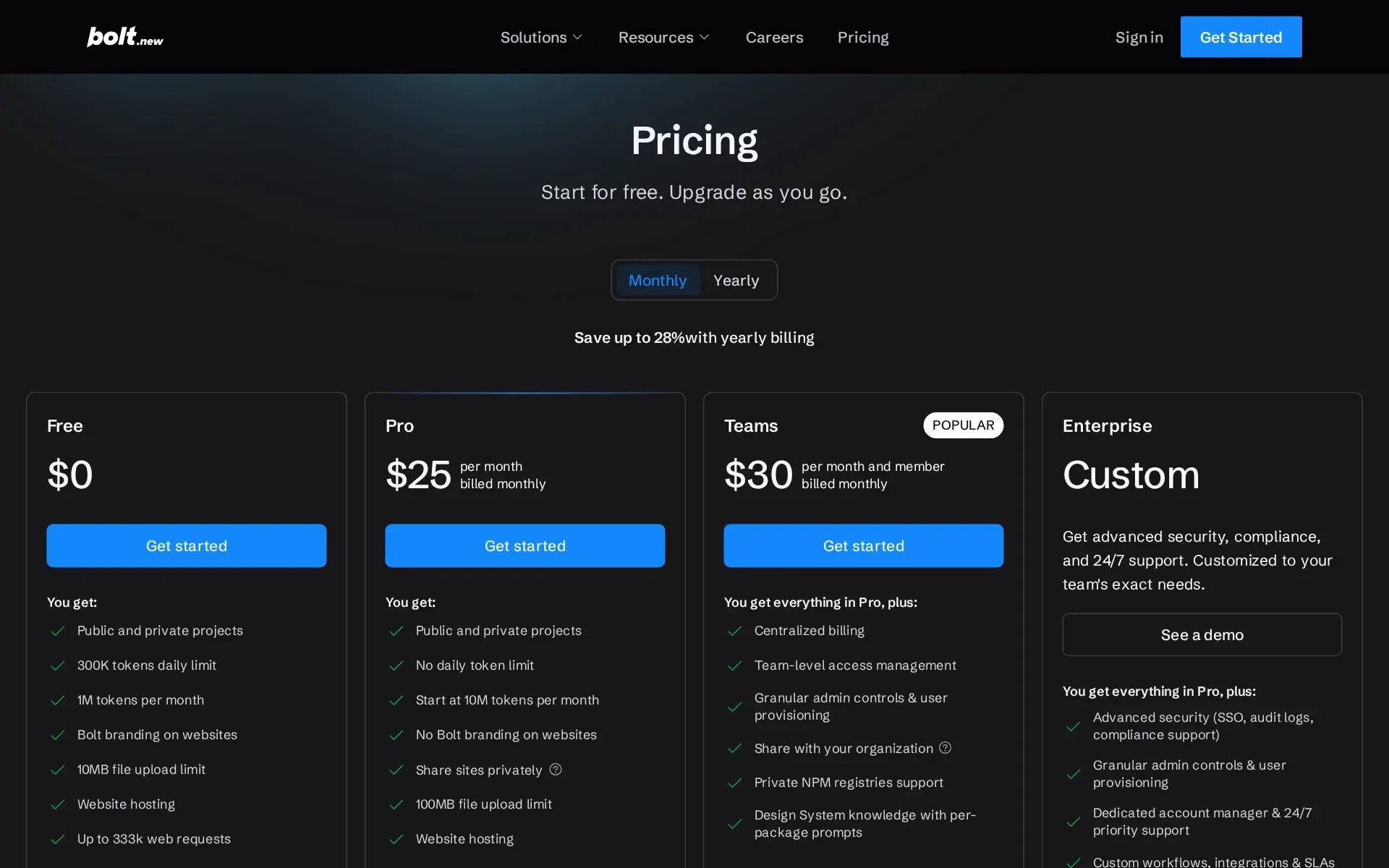
- YesTeams is charged per member, $30 a month month-to-month or $27 billed annually, and each member gets their own 10M-token starting allowance; no seat floor or ceiling is published.
Starts at 10M per member
bolt.new/pricing - Pooled budget
- NoTeam token allowances are not pooled: each member's tokens are allocated to that person and stay with them, so one heavy user cannot draw on a colleague's balance.
Tokens are assigned to each team member and stay linked to the person who accrued them.
support.bolt.new/account/tokens.md - Admin controls
- YesTeam admins can constrain real behaviour: which integrations members may connect, which deploy provider is used, whether sites may be public, and whether outsiders can be invited.Was Partly before our last check.
Controls whether team members can integrate their projects with GitHub, Stripe, and Supabase.
support.bolt.new/settings/team-settings… - Audit log
- PartlyAudit logs are the one governance row the comparison table withholds from Teams as well as Free and Pro; only Enterprise gets them, though Teams admins can export usage and member CSVs.bolt.new/pricing
- Single sign-on
- PartlySingle sign-on starts at Teams and is marked not included on Free and Pro; Enterprise adds Okta, Azure AD and other SAML providers with domain restrictions.
SSO with Okta, Azure AD, and all major SAML providers
bolt.new/enterprise
What happens to your code
- Opt out of training
- YesYou can opt out of model training and dataset licensing at no cost on any plan, EEA, UK and Swiss accounts are excluded outright, and MSA or DPA customers are excluded contractually.Was Partly before our last check.
you may opt out of the model-development and dataset-licensing uses of Bolt Model Development Content described above at any time, free of charge and…
stackblitz.com/privacy-policy - Data residency
- PartlyData sits with a US company and may be moved to the United States under standard contractual clauses; the only documented way to keep it in a chosen jurisdiction is the Enterprise BYOK tenant.
StackBlitz, Inc. is headquartered in the United States, and personal information may be transferred to, processed, and stored in countries outside of…
stackblitz.com/privacy-policy - Getting out
- YesYou can download any project as a zip and run it locally, and a terminated account keeps 30 days to retrieve content, but token allowances expire two months after issue and die with a cancellation.Was Partly before our last check.
You can download your project as a zip file to work on it outside of Bolt, using your own code editor.
support.bolt.new/managing-projects/proj… - Certifications
- PartlySOC 2 Type 2 plus GDPR and CCPA compliance are claimed for the platform, with reports behind a trust-centre request; ISO 27001 appears only in an Enterprise comparison row and is never stated as held.Was Yes before our last check.
Bolt is SOC 2 Type 2 certified and compliant with GDPR and CCPA. Full audit details and policies are available on our trust profile.
bolt.new/platform/security
Plans and pricing
Price and terms
- Free plan
- YesYes
The terms in full
$0/month, free forever and no card required: 1M AI tokens a month with a separate 300K daily cap, unlimited databases, website hosting on a bolt.host URL with 10 GB bandwidth and 333,333 web requests a month, 10MB file uploads, Bolt branding on published sites, and no custom domains, Max agent or Supabase.
What needs a higher plan
- Max agent
- Whole-codebase work
- Bolt Forge (Pro or Lite plan)
- Open models
- Enterprise
- Self-hosted, Bring your own key, Audit log
- Teams
- Single sign-on
From bolt.new/pricing, checked .
The Agents Index digest
Price changes and new agents like Bolt, at most once a week.
Last issue: Devin vs Claude Code: Which Should You Pick? · 13 October 2026
Works with
 Claude
- PartlyOpen models
Bolt Forge (Pro or Lite plan)
For AI agents
- MCP server
- No
- API
- No
Screenshots
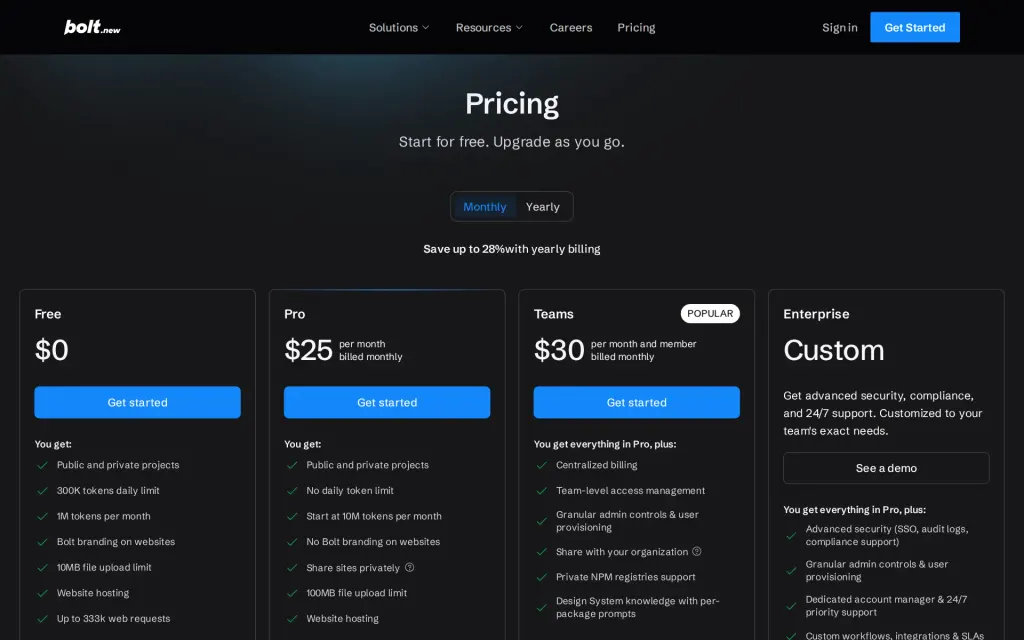
Pricing page, bolt.new, captured
Filed under
Sources and updates
Last changed
Sources44
- support.bolt.new/concepts/faq
- bolt.new/pricing
- support.bolt.new/concepts/faq.md
- bolt.new/platform/security
- support.bolt.new/building/using-bolt/agents
- support.bolt.new/building/using-bolt/agents.md
- bolt.new/enterprise
- support.bolt.new/reference/faq.md
- bolt.new/
- support.bolt.new/account-and-subscription/tokens.md
- bolt.new/
- support.bolt.new/account-and-subscription/tokens
- support.bolt.new/building/agents.md
- support.bolt.new/building/security.md
- support.bolt.new/building/using-bolt/code-view.md
- support.bolt.new/building/using-bolt/connect-mcp
- support.bolt.new/integrations/mcp.md
- stackblitz.com/privacy-policyIndependent source
- support.bolt.new/release-notes
- support.bolt.new/account-and-subscription/corporate-commercial
- support.bolt.new/account-and-subscription/teams/manage-team.md
- support.bolt.new/account/bolt-forge.md
- support.bolt.new/account/corporate-commercial.md
- support.bolt.new/account/tokens.md
- support.bolt.new/best-practices/plan-mode
- support.bolt.new/best-practices/plan-mode.md
- support.bolt.new/bolt-cloud/hosting/publish.md
- support.bolt.new/building/security
- support.bolt.new/building/using-bolt/code-view
- support.bolt.new/building/using-bolt/connect-mcp.md
- support.bolt.new/building/using-bolt/projects-files
- support.bolt.new/building/using-bolt/projects-files.md
- support.bolt.new/cloud/hosting/publish
- support.bolt.new/cloud/hosting/publish.md
- support.bolt.new/concepts/intro-llms.md
- support.bolt.new/get-started/intro-bolt
- support.bolt.new/integrations/git
- support.bolt.new/integrations/git.md
- support.bolt.new/llms.txt
- support.bolt.new/managing-projects/projects-files.md
- support.bolt.new/reference/supported-technologies.md
- api.github.com/repos/stackblitz/bolt.newRepository
- support.bolt.new/settings/team-settings
- support.bolt.new/settings/team-settings.md
Repository30 August 2026
- Licence
- MIT
- Stars
- 16,529
- Forks
- 14,792
- Last push
- 17 December 2024
Coverage elsewhere4
The Agents Index in AI answers0 of 1
- PerplexityDoes not cite The Agents IndexAsked
Bolt alternatives
on Other sources: g2.com, zite.com, rapidevelopers.com, assembly.com, bito.ai, bubble.io
Updates5
- Capabilities · Free tier · Plan limits · Terms
- Capabilities · Free tier · Terms
- Capabilities · Free tier · Terms
- Capabilities · Free tier · Price · Terms
- Alternatives · Summary · Tagline
Is this yours? Claim it free and edit it in your dashboard, or feature it in Coding agents.