
StackAI in our research
All researchStudy
AI Agent Pricing Index, October 2026
Pricing
Contact sales
15 of the 149 agents we checked ask you to contact sales for a price.
Price checked 9 September 2026.
What we checked on StackAI
Writes code
Only inside a workflow node: the Code Node ships an AI assistant that drafts Python or TypeScript that runs in a sandbox, not application source in a repository.
The Code Node lets you write and run custom Python or TypeScript code directly inside a Stack AI workflow, with the help from an AI code assistant.
Done-for-you service
You run the software yourself, but enterprise buyers also get StackAI people: forward-deployed engineers, weekly co-building sessions and dedicated solution engineers on the Enterprise plan.
StackAI provides the platform and forward-deployment engineers to help customers build complex use cases and deploy those with confidence.
Runs autonomously
Trigger nodes start workflows on external events or on a schedule with no operator present, and human review is an optional node rather than a requirement.
A Trigger Node is the starting point for any automated workflow. Once a specific event happens, the trigger automatically run your StackAI workflow.
Multi-agent
Subflow Tools let one orchestrating agent call other agents as named specialists, in parallel or in sequence, each with its own workflow and output node.
Subflow Tools enables orchestrations across a fleet of AI agents.
Agent permissions
Builders choose the stop points: an Ask Human tool pauses a run for approval, while admins allow or block individual tools, connectors and LLMs org-wide.
It allows an AI workflow to pause execution, request input from a human in the Chat Assistant interface, and then resume execution once the user…
Claude
Anthropic is one of the providers StackAI supplies hosted keys for, and the agent node's own settings document Claude-specific behaviour such as required streaming on long responses.
By default, Stack AI provides hosted API keys for popular providers (like OpenAI, Anthropic, etc.) so users can get started quickly.
GPT
OpenAI models are selectable directly, and the docs also describe adding them through an Azure OpenAI private-cloud connection for latency and compliance reasons.
Microsoft Azure and AWS Bedrock offer the ability to host private clouds with OpenAI models. You can add these models in Stack AI using an "Azure"…
Open models
Open-weight models are reachable two ways: Llama-family models through a Cerebras key, and any model you host yourself through the Local provider connection.
Stack AI integrates natively with Cerebras, letting you connect your Cerebras API key and use Llama-family models directly inside your workflows…
Model choice
The buyer picks provider and model per agent node and can switch later from a dropdown; admins may narrow that list but the vendor does not fix one model.
StackAI is provider-agnostic, just choose your favorite provider and select the model you'd like to use in your project.
In your editor
There is no StackAI editor plugin; the account is reachable from Cursor or Claude via the hosted MCP endpoint, which is an assistant integration rather than an IDE surface.
The StackAI MCP server connects your AI assistant — Claude, Cursor, or any assistant that supports the Model Context Protocol — directly to your…
On the command line
The published CLI installs and maintains the self-hosted platform on customer servers; it is an operations tool for on-prem deployments, not a way to drive an agent from a terminal.
Enterprise-grade command-line interface for auto-deploying, managing, and maintaining StackAI's platform on customer infrastructure.
In your pipeline
A GitHub node can read repositories and act on pull requests from inside a workflow, but nothing documents StackAI running as a step in a CI pipeline.
This node connects your StackAI automation to Github’s powerful API, making it easy to interact with repositories, pull requests, workflows, and more.
In a browser
Everything happens in the browser: a drag-and-drop canvas to build the agent and prebuilt hosted interfaces such as chat, forms and website chatbots to publish it.
Canvas: the main component of the Stack AI tool, a 2D canvas where you can drag and drop nodes and connect them to build your workflow.
Self-hosted
On-premise and VPC deployment exist but sit in the Enterprise column of the plan table; the free tier is multi-tenant cloud only, and deployment needs a licensed CLI.
StackAI's on-premise deployment offers enterprise-grade control, performance, and security by running entirely within your organization's…
Open source
Even the self-hosted build is proprietary: installing it requires a licence key and private registry credentials issued by an account manager, and the repository linked from the On-Premise page is not public.
StackAI License Key (provided by StackAI Account Manager)
How it meters
Consumption is metered in runs, where a run is one workflow execution; seats and projects are counted separately and the Enterprise run allowance is negotiated.
In StackAI, a run represents the execution of a workflow instance.
stackai.com/pricingChecked
Free tier
A standing zero-cost plan with 500 runs a month, two projects and one seat lets you build without talking to sales, though support is Discord only.
Start for free. Upgrade to get the capacity that exactly matches your team's needs.
stackai.com/pricingChecked
API access
Any published flow can be called as a REST endpoint with an org token, but the plan comparison marks API Access as an Enterprise row while ticking the REST API plugin on Free.
Once your flow is ready for production, you can deploy it as an API. Just click on deploy to get a production-ready version of your model.
MCP server
A hosted MCP server lets another assistant list, read, run and edit your workflows after an OAuth sign-in, and a MCP node lets your agents call outside MCP servers.
The connection URL is https://mcp.stack.ai/mcp, the same for everyone.
Bring your own key
Organisations can attach their own provider API keys, make them the workspace default, and switch off StackAI-supplied keys so all inference bills to their own accounts.
Once disabled, users must add their own connection (API key) to use that provider in workflows.
A company can buy it
The Enterprise plan is sold to organisations by quote and bundles seats, access control, SSO and compliance paperwork; there is no self-serve paid individual plan.
For teams who want a custom experience with advanced security and support.
stackai.com/pricingChecked
Seat model
Seats are counted - one on the free plan, a negotiated number on Enterprise - but no per-seat price, floor or ceiling is published anywhere on the site.
Custom number of seats
stackai.com/pricingChecked
Admin controls
Admins constrain the agents centrally: enable or disable individual LLMs, apps and tools, force org API keys, restrict who may publish and require SSO on interfaces.
Feature access allows admins to manage Multi-Factor Authentication, Knowledge Bases, LLM access, and more.
Audit log
Run-level activity and project version history are recorded and downloadable, but no page documents an audit trail of administrative actions such as role or policy changes.
Downloadable project analytics show who ran what, when, with which models, token counts, latency, and per-step traces (inputs, KB hits, outputs).
Single sign-on
SAML SSO with Okta or Entra plus SCIM provisioning is documented, but the plan comparison shows SSO unavailable on Free and included only with Enterprise.
Connect your Identity Provider to enable login and role-mapping through SAML protocol.
stackai.com/securityChecked
Opt out of training
No opt-out toggle is needed because the vendor states training is contractually excluded through DPAs with the model providers; its OpenAI and Anthropic DPAs are published.
We ensure that your data is not used for training AI models through data processing addendums (DPAs).
stackai.com/securityChecked
Data residency
Residency is solved by moving the software, not by picking a region: on-premise and VPC deployments are offered, while no region list is published for the hosted cloud.
For organizations with strict data residency or sovereignty requirements, StackAI offers On-Premise deployment options, critical for industries like…
Getting out
Projects export to a JSON file you can keep or re-import, and analytics are downloadable; runs are a monthly allowance rather than credits that accrue.
A JSON file will be downloaded, this is the workflow that can be imported or saved locally.
Certifications
The docs claim SOC 2 Type II, HIPAA, GDPR, CCPA-CPRA and ISO 27001, a SOC 2 report is requestable and a BAA is listed as an Enterprise-only row.
StackAI is SOC 2 Type II, HIPAA, GDPR, and CCPA-CPRA compliant, with ISO 27001 certification.
StackAI price and terms
Terms
- Free plan
- YesYesFree plan at $0/month: 500 runs per month, 2 projects, 1 seat, community support on Discord
The terms in full
No paid self-serve tier is published; the only other plan is Enterprise at a custom quote.
What needs a higher plan
- Enterprise
- Self-hosted, Single sign-on
For AI agents
- MCP server
- Yes
- API
- Partly
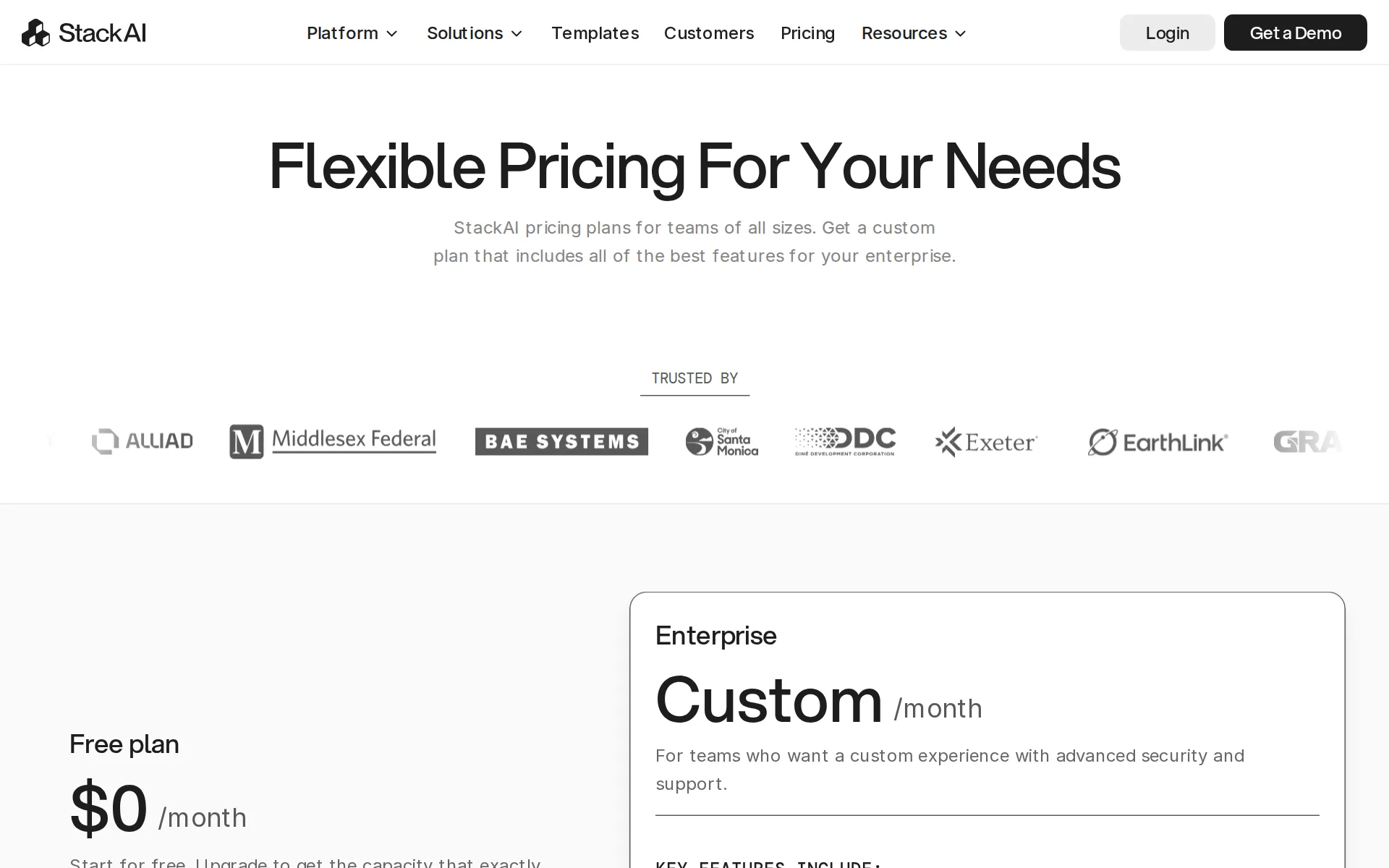
Pricing page, captured
stackai.com/pricing, checked
StackAI alternatives
All 9 alternatives- This spot is openBe the first agent people see on StackAI's page.
- First on your rivals' pages
- Top of your category
- First in the home page list
- First in search results
- In comparisons and guides
- In the weekly newsletter
- Visits and AI reads each month
7 more alternatives
7 of the 9 publish a price.
- GumloopFrom $37 a monthMultiplayer AI agent builder: teams build agents over their apps while IT keeps governance and spend control.
- DustFree, then about $34 a seat a monthPlatform for building and running company agents on connected tools, data and 20+ models.
- DifyFree, then $59 a monthVisual platform for agentic workflows and RAG, on Dify Cloud, your VPC or self-hosted.
- ManusFree, then $20 a monthGeneral-purpose AI agent that plans and executes multi-step tasks on its own cloud computer.


Questions about StackAI
- How much does StackAI cost?
- StackAI is free to use. From stackai.com/pricing, checked 29 October 2026.
- Does StackAI have an API or an MCP server?
- It has a limited API. It has an MCP server.
- Is StackAI open source, and can you host it yourself?
- It is not open source. You can host it yourself on Enterprise.
- What have we checked on StackAI?
- 29 facts, under these headings: What it does, how much it does unattended, which models it runs on, where you use it, whose machine it runs on, what it costs to run, buying it for a team, what happens to your code.
- How do we check StackAI?
- We hold 29 facts on StackAI, quoted from 20 pages. Facts last checked 9 September 2026. Price last checked 29 October 2026.
Sources and changes
Last changed
Sources20
- stackai.com/pricing
- docs.stackai.com/welcome-to-stackai/overview/what-makes-stackai-unique
- docs.stackai.com/interface-and-deployment/mcp-reference/stackai-mcp-server
- stackai.com/security
- docs.stackai.com/stackai-auto-cli/readme
- docs.stackai.com/workflow-builder/core-nodes/ai-agent-node/llm-hosting-and-governance/llm-provider-governance
- docs.stackai.com/interface-and-deployment/end-user-interfaces/api
- docs.stackai.com/interface-and-deployment/end-user-interfaces/exporting-and-importing-projects
- docs.stackai.com/welcome-to-stackai/overview/platform-overview
- docs.stackai.com/welcome-to-stackai/security-and-governance/ai-governance
- docs.stackai.com/welcome-to-stackai/security-and-governance/on-premise
- docs.stackai.com/welcome-to-stackai/security-and-governance/security-in-stackai/feature-access
- docs.stackai.com/workflow-builder/apps/cerebras
- docs.stackai.com/workflow-builder/apps/github
- docs.stackai.com/workflow-builder/core-nodes/ai-agent-node
- docs.stackai.com/workflow-builder/core-nodes/ai-agent-node/llm-hosting-and-governance/llms-hosted-on-azure-and-aws-bedrock
- docs.stackai.com/workflow-builder/core-nodes/ai-agent-node/subflow-tools
- docs.stackai.com/workflow-builder/core-nodes/stackai/human-in-the-loop
- docs.stackai.com/workflow-builder/inputs/trigger-node
- docs.stackai.com/workflow-builder/utils-logic-and-others/logic/code-node
Is this yours?
AI assistants like ChatGPT and Claude opened The Agents Index pages 2,746 times in September. Claiming is free. You get this page's reader numbers and the verified owner mark. You confirm it with an email at stackai.com.
Report an error if a fact is wrong.