
Warp in our research
All researchStudy
AI Agent Pricing Index, October 2026
Price in Coding agents
$20a month
Pricier than 8 of the other 21 agents with a monthly price.
Price checked 3 September 2026.
What we checked on Warp
Writes code
The coding agent generates and edits code from natural-language prompts and surfaces the result as inline diffs you accept or reject.
Warp's coding agent is designed to help you generate, edit, and manage code directly in the Agentic Development Environment.
docs.warp.dev/code/overviewChecked
Debugs and fixes
Local agents diagnose failures in a real terminal; in CI the agent pulls failure logs, attempts a root-cause fix and opens a PR with it.
The agent integrates seamlessly into your CI pipeline, automating tasks like code review, issue triage, bug fixing, and maintenance using your…
Writes tests
Test authoring is one of the vendor's enumerated coding capabilities, and the agent can run the test it wrote inside a REPL session.
“Identify functions without test coverage and create Jest test files for them.”
docs.warp.dev/code/overviewChecked
Reviews code
Cloud agents review other people's pull requests and comment inline, via GitHub Actions or the GitHub App; the in-app review panel is the inverse, a human reviewing the agent.
Agent inspects changed files, analyzes the diff, and comments inline
Whole-codebase work
Codebase Context indexes the Git-tracked repo (and other indexed repos) so agents can carry repo-wide changes; index size caps vary by plan, at least 5,000 files per codebase on every plan.
Codebase Context helps Agents understand your project by indexing your local codebase.
Ships it
Agents commit, push branches and open pull requests through the GitHub integration, but no page describes the agent performing a deployment.
Posts progress updates and a final summary back into the thread, including any pull requests the agent opened and branches it pushed.
Done-for-you service
You run the software. The only services Warp sells are Enterprise-tier onboarding, a named implementation engineer and an account manager; no build-and-run engagement is offered.
White-glove onboarding and implementation engineer support
warp.dev/pricingChecked
Runs autonomously
Cloud agents run unattended from schedules, integrations, CI or the API; locally, Run until completion auto-approves every command until the task ends.
Warp cloud agents can run unattended from schedules, team tools, CI, the Oz CLI, or the API.
Multi-agent
One agent spawns and coordinates children, which may run a different harness than the parent; orchestrations are one level deep and require approval before launch.
Multi-agent orchestration lets one agent spawn and coordinate other agents to parallelize work, delegate specialized tasks, or verify another agent's…
Agent permissions
Four autonomy levels per action type, plus regex allowlist and denylist; the denylist wins, except that Run until completion bypasses your personal denylist while admin-enforced rules still hold.
The denylist takes precedence over both the allowlist and Agent decides: if a command matches the denylist, the Agent asks for permission even when…
Claude
Anthropic models are a first-class option in the model picker, and Claude Code can also be used as the agent harness inside Warp.
Models from OpenAI, Anthropic, Google, and open source providers are available, with configurable reasoning levels and per-profile defaults.
GPT
OpenAI models are listed in the vendor's own model table alongside Anthropic and Google; Codex is also supported as an alternative harness.
On the page: Intro paragraph, above "Available models"
Open models
Open-weight models are hosted for you through Fireworks AI, and an Auto (Open-weights) router picks between them; Llama is absent from that enumerated table.
Warp also supports leading open source models hosted via Fireworks AI, so you can run them from inside Warp without setting up your own inference…
Model choice
You pick from the model picker or write your own routing rules; an admin or your plan can grey out models, and Auto hands selection back to Warp if you want it.
Warp lets you choose from a curated set of large language models to power your agents, or let Warp auto-select the best model for each task.
In your editor
There is no first-party IDE or editor extension; Warp ships its own editor and diff review and positions itself as the thing that replaces the external IDE. It can only launch your editor.
It detects opportunities to apply code diffs and surfaces them inline, allowing you to review and apply changes without switching to an external IDE.
docs.warp.dev/code/overviewChecked
On the command line
Two terminal surfaces: the Warp Terminal app for macOS, Linux and Windows, and a standalone agent CLI that runs in any terminal without the app.
The Warp Agent CLI is a standalone terminal program that runs the same agent without the Warp app.
docs.warp.devChecked
In your pipeline
Two paths onto a pull request: the oz-agent-action GitHub Action inside your workflows, or mentioning the GitHub App on an issue, PR or review comment with no workflow file.
Run agents directly in your GitHub Actions workflows using oz-agent-action.
In a browser
A browser app manages cloud agents, runs, schedules and environments without installing Warp, and works on mobile; Warp Drive is also reachable on the web.
The Oz web app provides a visual interface for managing cloud agents. You can start runs, browse agents and skills, create schedules, configure…
Self-hosted
Enterprise only, and execution plane only: agents run on your machines while orchestration, session management and inference still route through Warp's backend.
Self-hosted agents are available exclusively to teams on an Enterprise plan.
Open source
The client is AGPL v3 and auditable. Nothing Warp says makes the same claim for the Automation Platform, cloud agents or Factories, and no licence is named for them.
Warp's client is open source under AGPL v3, so the editor and terminal that host your agents are fully auditable.
docs.warp.dev/agentsChecked
How it meters
Per-credit, on top of a per-seat subscription. A credit is token-proportional and non-deterministic, metered across inference, sandbox compute and platform, all drawing on one balance.
A credit in Warp is a unit of work representing the total processing required to complete an interaction with an Agent. It is not the same as “one…
Free credit
$20 of free usage, a month.
Warp shows agent usage in dollars. Build includes $20 of agent usage each month, Business includes $20 per seat each month, and Max includes $200…
warp.dev/pricingChecked
Free tier
The Free plan is a self-serve download with no call, but it bundles no agent usage: you must buy add-on credits or bring your own inference before the agent will run on Warp models.
The Free plan doesn't include bundled AI usage for the Warp Agent.
API access
A REST API with a published OpenAPI spec creates and inspects cloud agent runs, with official Python and TypeScript SDKs; a separate read-only analytics API is Enterprise-only.
The Oz API & SDK lets you create, monitor, and inspect cloud agent runs programmatically. Use the REST API from any HTTP client, or the official…
MCP server
Warp is a mature MCP client for local and cloud agents. Being queried by another agent works only through the hosted Factory MCP server, which is inside Warp Factories Early Access.
Factory MCP is a hosted Model Context Protocol (MCP) server that connects coding agents to your team's factories, in both directions
Bring your own key
Three levels: your own provider key stored on your device, your own OpenAI-compatible endpoint, and Enterprise BYOLLM through your AWS or Google Cloud account. Device-local keys do not reach cloud agents, and orgs over ten employees need Business or Enterprise.
Use your own API key for OpenAI, Anthropic, or Google models. Keys are stored locally on your device.
A company can buy it
Business is self-serve per user up to 25 seats; Enterprise is sales-led and applied by Warp internally, billed by invoice through an account manager.
For teams scaling AI-powered development (up to 25 seats)
warp.dev/pricingChecked
Seat model
Priced per user with a 25-seat ceiling on Business and unlimited seats on Enterprise; no minimum seat count is published, and seats are prorated on add and remove.
On paid plans, adding new members automatically adds them as paid seats. New members are billed on a prorated basis for the remainder of the billing…
Pooled budget
Split model: each seat gets its own monthly credit allowance, while purchased top-up credits go into one team-wide pool. Only Enterprise gets a contracted shared pool by default.
On the multi-seat paid plans, plan-included credits are per-seat while add-on credits are shared across the team
Admin controls
Admins set org-wide autonomy per action type plus regex command allowlists and denylists, and can lock users out of overriding them. On Free most settings are fixed; configurability starts at Business and is complete on Enterprise.
Configure how agents behave across your organization, including autonomy levels and command permissions. This is where you balance agent productivity…
Audit log
Warp logs agent actions, and an Enterprise analytics API returns message-level events for compliance review, but it needs an admin toggle and there is no audit trail of admin configuration changes.
Audit message-level activity - Filter the events endpoint by run_type, user_id, conversation_id, message_type, or tool_type for compliance reviews…
Single sign-on
Both SAML 2.0 and OIDC, with Okta, Entra ID, Google Workspace and OneLogin named, plus SCIM and admin-enforced SSO. Gated: SAML SSO starts at Business, and Free through Max sign in with password, Google or GitHub instead.
Any SAML 2.0 or OpenID Connect (OIDC) compatible provider
Opt out of training
Zero Data Retention agreements with the contracted providers apply on every plan, including Free; admins on Business and Enterprise can additionally switch off the optional interaction-data sharing, which is already off by default there.
Warp has Zero Data Retention (ZDR) agreements with its contracted LLM providers (Anthropic, OpenAI, Google), meaning they do not store or train on…
Data residency
United States only, on Google Cloud. No EU or other region is offered anywhere on the site; Enterprise BYOLLM is the one lever that moves inference into your own cloud account.
Any data supplied to Warp by users or companies is stored on Google Cloud Platform. Database locations are in the United States.
warp.dev/legal/securityChecked
Getting out
Account and data deletion is self-serve within 30 days, and Drive notebooks and workflows export as Markdown and YAML, but no bulk export tool is documented. Monthly plan credits expire each cycle; purchased credits last 12 months and are forfeited if you leave the team.
Unused credits do not rollover to the next cycle and can't be transferred to other accounts.
Certifications
SOC 2 Type II attested, report on request via the trust centre; GDPR handled contractually through a DPA with EU SCCs and the UK Addendum. ISO 27001 is claimed only of Google's datacentres, not of Warp.
Yes, Warp has obtained a SOC 2 Type 2 attestation from an accredited third party. Visit Warp's Trust Center to request the report.
warp.dev/legal/securityChecked
Warp price and terms
Terms
- Free plan
- YesYes
The terms in full
Standing $0/month Free plan: core terminal, Warp Agent CLI access, limited cloud agents access, limited Warp Drive and cloud conversation storage, and additional agent usage only at pay-as-you-go rates that the FAQ states are 20% higher than paid-plan prices.
What needs a higher plan
- Enterprise
- Self-hosted, Audit log
- Business or Enterprise
- Admin controls, Single sign-on
For AI agents
- MCP server
- Partly
- API
- Yes
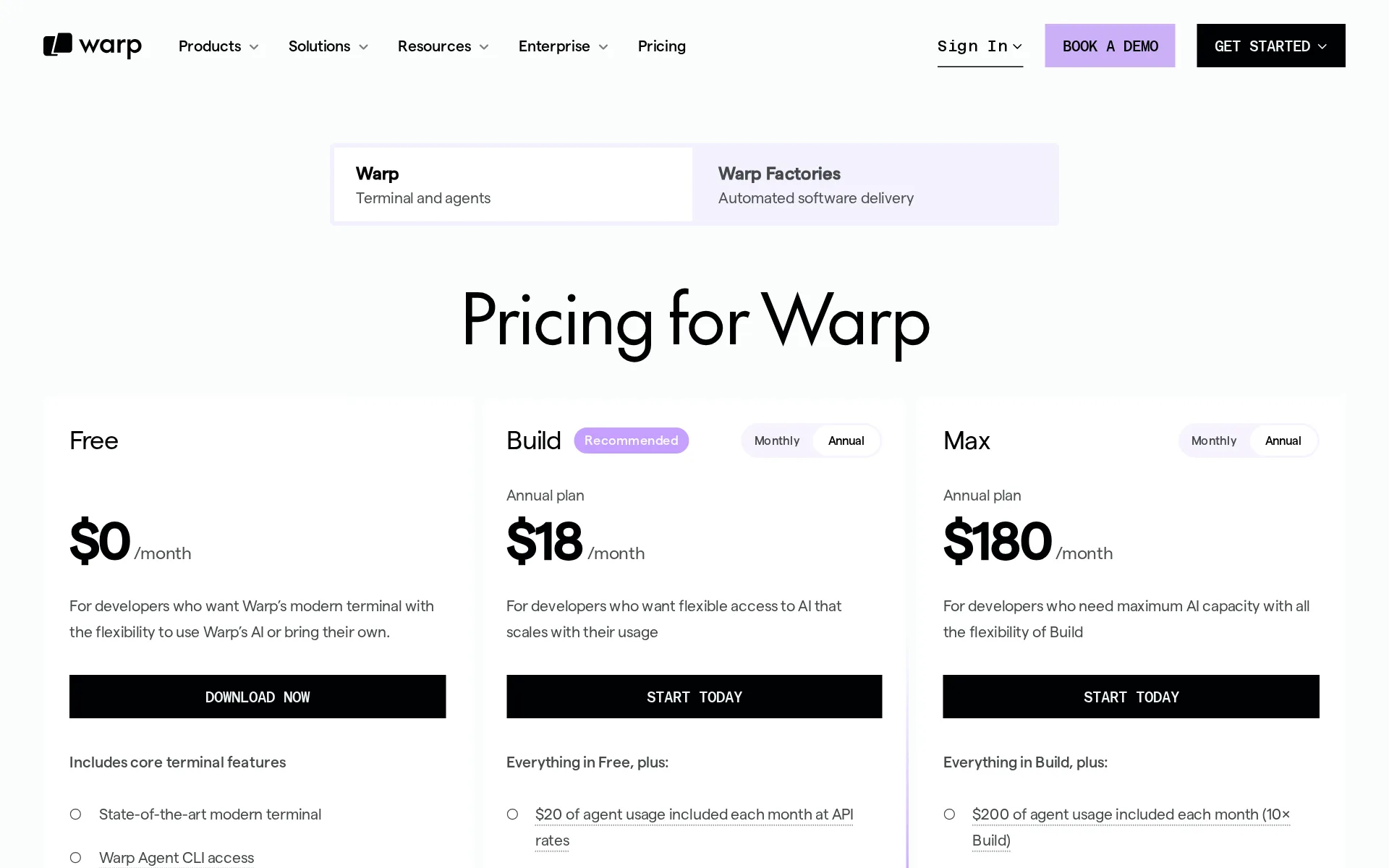
Pricing page, captured
warp.dev/pricing, checked
Warp alternatives
All 9 alternatives- This spot is openBe the first agent people see on Warp's page.
- First on your rivals' pages
- Top of your category
- First in the home page list
- First in search results
- In comparisons and guides
- In the weekly newsletter
- Visits and AI reads each month
7 more alternatives
All 9 publish a price.
- Google Antigravity CLIFree, then $30 a seat a monthTerminal agent (agy) that runs Google Antigravity coding agents and parallel subagents.
- Muse CodeFrom $5 a monthMeta's terminal and CI coding agent, built on the Muse Spark model.
- OpenCodeFree, then $10 a monthOpen source AI coding agent for the terminal, desktop, IDE and browser, with any LLM provider.
- CursorFree, then $8 a monthCoding agent in a desktop editor, terminal CLI, cloud VMs and CI, priced per seat plus token usage.


Questions about Warp
- How much does Warp cost?
- Warp is free to use. From warp.dev/pricing, checked 1 November 2026.
- Does Warp have an API or an MCP server?
- It has an API. It has a limited MCP server.
- Is Warp open source, and can you host it yourself?
- Part of it is open source. You can host it yourself on Enterprise.
- What have we checked on Warp?
- 36 facts, under these headings: What it does, how much it does unattended, which models it runs on, where you use it, whose machine it runs on, what it costs to run, buying it for a team, what happens to your code.
- How do we check Warp?
- We hold 36 facts on Warp, quoted from 33 pages. Facts last checked 24 October 2026. Price last checked 1 November 2026.
Sources and changes
Last changed
Sources33
- docs.warp.dev/agents/inference/model-choice
- warp.dev/pricing
- docs.warp.dev/code/overview
- docs.warp.dev/platform/faqs
- docs.warp.dev/platform/integrations/github-actions
- docs.warp.dev/
- docs.warp.dev/agents
- docs.warp.dev/enterprise
- docs.warp.dev/enterprise/security-and-compliance/security-overview
- warp.dev/legal/security
- docs.warp.dev/support-and-community/plans-and-billing/credits
- docs.warp.dev/support-and-community/plans-and-billing/pricing-faqs
- warp.dev/
- docs.warp.dev/agents/capabilities/agent-profiles-permissions
- docs.warp.dev/agents/capabilities/codebase-context
- docs.warp.dev/agents/inference/bring-your-own-api-key
- docs.warp.dev/code/code-editor
- docs.warp.dev/enterprise/enterprise-features/analytics-api
- docs.warp.dev/enterprise/security-and-compliance/sso
- docs.warp.dev/enterprise/support-and-resources/billing
- docs.warp.dev/enterprise/team-management/admin-panel
- docs.warp.dev/enterprise/team-management/teams
- docs.warp.dev/factories/factory-mcp
- docs.warp.dev/guides/agent-workflows/how-to-run-unattended-agents
- docs.warp.dev/platform/integrations/github
- docs.warp.dev/platform/integrations/quickstart-github-actions
- docs.warp.dev/platform/orchestration
- docs.warp.dev/platform/orchestration/multi-agent-runs
- docs.warp.dev/platform/oz-web-app
- docs.warp.dev/platform/self-hosting
- docs.warp.dev/reference/api-and-sdk
- api.github.com/repos/warpdotdev/warpRepository
- docs.warp.dev/support-and-community/plans-and-billing/plans-pricing-refunds
Written about it elsewhere1
Repository30 August 2026
- Licence
- AGPL-3.0
- Stars
- 64,654
- Forks
- 5,489
- Last push
- 30 August 2026
Is this yours?
AI assistants like ChatGPT and Claude opened The Agents Index pages 2,746 times in September. Claiming is free. You get this page's reader numbers and the verified owner mark. You confirm it with an email at warp.dev.
Report an error if a fact is wrong.