AI Agent Pricing Index · October 2026
The median AI agent started at $29 a month in October 2026, and 57% had a free tier.
Voice agents start lowest, at $17 a month. Sales & marketing agents and support agents start highest, at $99.
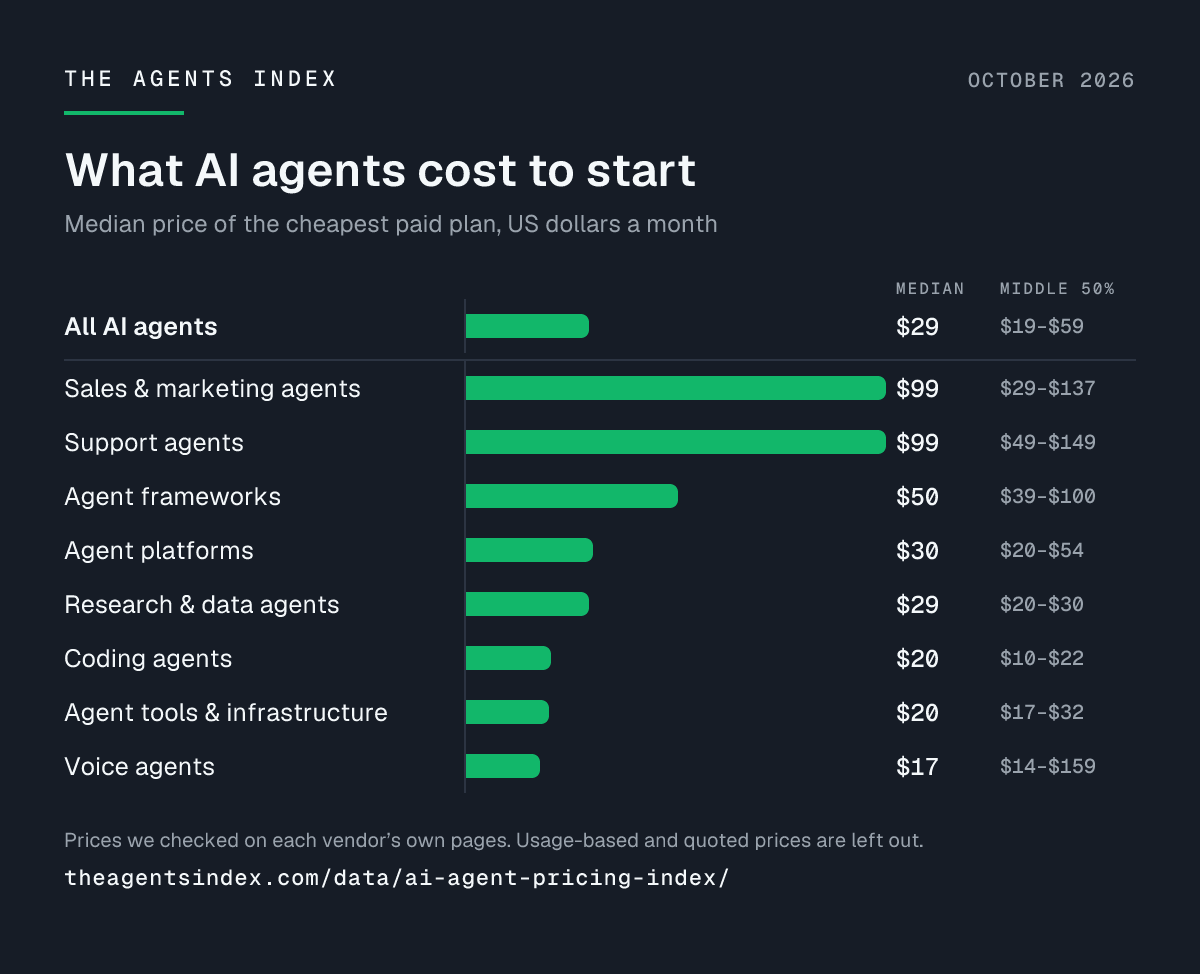
| Category | Median | Middle 50% | Priced | Free tier |
|---|---|---|---|---|
| All AI agents | $29 | $19–$59 | 85 of 149 | 57% |
| Agent platforms | $30 | $20–$54 | 22 of 32 | 67% |
| Coding agents | $20 | $10–$22 | 22 of 29 | 82% |
| Voice agents | $17 | $14–$159 | 12 of 22 | 23% |
| Sales & marketing agents | $99 | $29–$137 | 12 of 17 | 47% |
| Agent frameworks | $50 | $39–$100 | 7 of 16 | 94% |
| Research & data agents | $29 | $20–$30 | 9 of 14 | 71% |
| Support agents | $99 | $49–$149 | 5 of 14 | 25% |
| Agent tools & infrastructure | $20 | $17–$32 | 8 of 11 | 70% |
| Agencies & build partners | – | – | 0 of 9 | 0% |
Method. We checked each agent's pricing on the vendor's own pages between 2 September and 13 October 2026: 149 of the 151 AI agents we list. The entry price is the cheapest paid plan, in US dollars a month. Yearly prices are divided by 12. 85 agents have one. Usage-based, one-time and quoted prices, and prices in other currencies, are left out of the medians. A free trial doesn't count as a free tier. A price change counts only when a later check saw it on the vendor's page. Full method
Free tiers
82 of the 144 AI agents whose pages say either way have a free tier (57%). 41 offer only a free trial or a limited plan, and 21 have neither.
| Category | Free tier | Trial or limited | None | Share |
|---|---|---|---|---|
| All AI agents | 82 | 41 | 21 | 57% |
| Agent platforms | 20 | 7 | 3 | 67% |
| Coding agents | 23 | 2 | 3 | 82% |
| Voice agents | 5 | 16 | 1 | 23% |
| Sales & marketing agents | 8 | 6 | 3 | 47% |
| Agent frameworks | 15 | 1 | 0 | 94% |
| Research & data agents | 10 | 3 | 1 | 71% |
| Support agents | 3 | 5 | 4 | 25% |
| Agent tools & infrastructure | 7 | 2 | 1 | 70% |
| Agencies & build partners | 0 | 3 | 6 | 0% |
How they charge
How the cheapest paid plan is billed, for all 149 AI agents.
| Pricing model | Agents | Share |
|---|---|---|
| Flat fee | 91 | 61% |
| Free only | 17 | 11% |
| Contact sales | 15 | 10% |
| Usage-based | 14 | 9% |
| Per seat | 7 | 5% |
| One-time fee | 5 | 3% |
Changes since last month
We found no confirmed price or free-tier changes in the 30 days to 13 October 2026.
Every agent's price
Show all 149 agents
| Agent | Entry price | Free tier | Checked |
|---|---|---|---|
| 11x | Contact sales | None | 23 September 2026 |
| Accio Work (via Corpable) | $2,999 a year | Free trial or limited | 27 September 2026 |
| Ada | Contact sales | Not stated | 12 October 2026 |
| AgentBridge | Free only | Free tier | 12 October 2026 |
| Agentix Labs | Contact sales | Free trial or limited | 12 October 2026 |
| AgentsKit | Free only | Free tier | 12 October 2026 |
| Agno | $150 a month | Free tier | 11 October 2026 |
| Aide | $99 a month | Free trial or limited | 23 September 2026 |
| Aident Loadout | $9.90 a month | Free tier | 3 October 2026 |
| Aider | Free only | Free tier | 30 September 2026 |
| Aisera Agent Composer (Agent Studio) | Contact sales | Not stated | 24 September 2026 |
| AiZipZap | Free only | Free tier | 10 September 2026 |
| Amplemarket | $600 a month, billed yearly | Free trial or limited | 10 September 2026 |
| Antigravity CLI | €21.99 (about $25) a month | Free tier | 10 September 2026 |
| Argorant | $99 a month | Free trial or limited | 26 September 2026 |
| Arsum | $5,000 per engagement | None | 3 October 2026 |
| Artisan | $280 a month | Free tier | 10 September 2026 |
| AudioCodes Live Hub | $0.05 per minute | Free trial or limited | 24 September 2026 |
| Augment Code | $100 a month | Free trial or limited | 2 September 2026 |
| Auto-Respond | $10 a month | Free trial or limited | 11 September 2026 |
| AutoGen | Free only | Free tier | 19 September 2026 |
| Bitsclan IT Solutions | $1,500 per engagement | None | 11 September 2026 |
| Bland | $0.14 per minute | Free tier | 11 September 2026 |
| Bolt | $25 a month | Free tier | 11 September 2026 |
| Botpress | $189 a month | Free tier | 2 September 2026 |
| Botsify | $149 a month | Free trial or limited | 13 September 2026 |
| Browserbase | $20 a month | Free tier | 2 September 2026 |
| Cartesia | $5 a month | Free tier | 2 September 2026 |
| Claude Agent SDK | $1 per million input tokens | Free trial or limited | 2 September 2026 |
| Claude Code | $20 a month | None | 2 September 2026 |
| Cline | $9.99 a month | Free tier | 12 September 2026 |
| CodeRabbit | $30 a month | Free tier | 15 September 2026 |
| Codex CLI | $8 a month | Free tier | 2 September 2026 |
| CommentKeyword | $12 a month | Free tier | 28 September 2026 |
| Converly | €39.99 (about $45) a month | None | 12 October 2026 |
| Crescendo | $1.25 per resolution | None | 12 September 2026 |
| Cresta | Contact sales | None | 13 September 2026 |
| CrewAI | Contact sales | Free tier | 13 September 2026 |
| Cursor | $20 a month | Free tier | 2 September 2026 |
| Decagon | Contact sales | None | 14 September 2026 |
| Deepgram Voice Agent API | $0.05 per minute | Free trial or limited | 2 September 2026 |
| Devin | $20 a month | Free tier | 2 September 2026 |
| Devin Desktop | $20 a month | Free tier | 3 September 2026 |
| Dify | $59 a month | Free tier | 2 September 2026 |
| Dust | €30 (about $34) per seat per month | Free tier | 1 October 2026 |
| ElevenLabs Agents | $6 a month | Free tier | 2 September 2026 |
| Elicit | $75 a month | Free tier | 14 September 2026 |
| ERIUS PHONE | $39 a month | None | 9 October 2026 |
| EximAgent | $29 a month | Free tier | 12 October 2026 |
| Faceless.so | $29 a month | Free trial or limited | 3 October 2026 |
| Factory | $20 a month | None | 2 September 2026 |
| Fin | $0.99 per outcome | Free trial or limited | 18 September 2026 |
| Firecrawl | $19 a month | Free tier | 24 September 2026 |
| GC AI | $500 per seat per month | Free trial or limited | 14 September 2026 |
| Gemini Code Assist | $22.80 a month | None | 2 September 2026 |
| Genspark | $30 a month | Free tier | 15 September 2026 |
| GitHub Copilot | $10 a month | Free tier | 2 September 2026 |
| Glypse | Free only | Free tier | 5 October 2026 |
| Google Agent Development Kit (ADK) | Free only | Free tier | 15 September 2026 |
| goose | Free only | Free tier | 16 September 2026 |
| GPT Researcher | Free only | Free tier | 16 September 2026 |
| Gumloop | $37 a month | Free trial or limited | 30 September 2026 |
| HeyRik | ₹999 a month | Free trial or limited | 10 September 2026 |
| HOL Guard | $4.99 a month | Free tier | 29 September 2026 |
| IrisAgent | $500 a month | Free tier | 24 September 2026 |
| jobfinder-ai | $29 a month | Free tier | 14 September 2026 |
| Juggler | Free only | Free tier | 17 September 2026 |
| Julius AI | $20 a month | Free tier | 17 September 2026 |
| Junie | $10 a month | Free tier | 18 September 2026 |
| Kalyvox | $95 a month | Free trial or limited | 26 September 2026 |
| Kilo Code | $15 a month | Free tier | 2 September 2026 |
| LangChain | $39 per seat per month | Free tier | 18 September 2026 |
| Langflow | Free only | Free tier | 25 September 2026 |
| LangGraph | $39 a month | Free tier | 2 September 2026 |
| Lead Scorer | €99 (about $111) a month | Free tier | 18 September 2026 |
| Leaping AI | $1,000 a month | Free trial or limited | 9 September 2026 |
| Letta | $20 a month | Free tier | 2 September 2026 |
| Lindy | $29.99 a month | Free trial or limited | 19 September 2026 |
| Lior | $8 per deliverable | None | 10 October 2026 |
| LiveKit Agents | $50 a month | Free tier | 2 September 2026 |
| LlamaIndex | $50 a month | Free tier | 2 September 2026 |
| LuMay | $249 a month | Free trial or limited | 9 September 2026 |
| Manus | $20 a month | Free tier | 19 September 2026 |
| Mastra | $250 a month | Free tier | 2 September 2026 |
| Maven AGI | Contact sales | None | 25 September 2026 |
| Microsoft Agent Framework | Free only | Free tier | 19 September 2026 |
| MindStudio | $20 a month | Free tier | 20 September 2026 |
| Mixdesk | $49 a month | Free tier | 3 October 2026 |
| Modurian | $40 a month | Free trial or limited | 9 October 2026 |
| Moveworks | Contact sales | None | 20 September 2026 |
| Muse Code | $5 a month | Not stated | 20 September 2026 |
| n8n | €24 (about $27) a month | Free tier | 2 September 2026 |
| NeverApply | $29 a month | Free trial or limited | 29 September 2026 |
| Novastart | $10 a month | Free tier | 8 October 2026 |
| Octacer | Contact sales | None | 26 September 2026 |
| OmniDimension | $15 a month | Free trial or limited | 9 September 2026 |
| OpenAI Agents SDK (Python) | Free only | Free tier | 20 September 2026 |
| OpenAI Realtime API | $10 per 1m audio input tokens | None | 2 September 2026 |
| OpenClaw | Free only | Free tier | 21 September 2026 |
| OpenCode | $10 a month | Free tier | 21 September 2026 |
| OpenHands | $0.10 per 1m input tokens | Free tier | 21 September 2026 |
| Perplexity | $20 a month | Free tier | 2 September 2026 |
| Pickaxe | $37 a month | Free tier | 9 September 2026 |
| PitchAI Agent Engine | €400 (about $448) a month | Free trial or limited | 3 October 2026 |
| Precision AI OS | Contact sales | None | 6 October 2026 |
| Pydantic AI | Free only | Free tier | 21 September 2026 |
| Qualified | Contact sales | None | 22 September 2026 |
| Relevance AI | $29 a month | None | 22 September 2026 |
| Replit Agent | $20 a month | Free tier | 22 September 2026 |
| Retell AI | $0.07 per minute | Free trial or limited | 23 September 2026 |
| Revnu | $99 a month | Free trial or limited | 11 October 2026 |
| Ringly | $349 a month | Free trial or limited | 9 September 2026 |
| Rox | $100 a month | Free tier | 2 September 2026 |
| SafeNet Creations | CA$149 (about $106) a month | None | 28 September 2026 |
| Salesforce Agentforce | $5 per user per month | Free tier | 3 September 2026 |
| SalesTouch | $39 a month | Free trial or limited | 25 September 2026 |
| SEObot | $49 a month | None | 25 September 2026 |
| SEOmatic | €89 (about $100) a month | Free tier | 3 October 2026 |
| Sierra | Contact sales | Not stated | 26 September 2026 |
| Sim | $25 per seat per month | Free tier | 3 September 2026 |
| sipgate flow | Contact sales | Not stated | 26 September 2026 |
| SkaleAgents | $19 a month | Free tier | 3 October 2026 |
| SkipCalls | $19.99 a month | Free trial or limited | 26 September 2026 |
| Spiich | €149 (about $167) a month | Free trial or limited | 15 September 2026 |
| StackAI | Contact sales | Free tier | 9 September 2026 |
| Synthflow | $30,000 a year | Free tier | 3 September 2026 |
| Tale | CHF 12 a month | Free tier | 3 October 2026 |
| TecAdRise | €150 (about $168) per setup | Free trial or limited | 12 September 2026 |
| TelEcho | $0.07 per minute | Free trial or limited | 16 September 2026 |
| Telnyx Voice AI Agents | $0.05 per minute | Free trial or limited | 9 September 2026 |
| TinyFish | $0.016 per agent step | Free tier | 3 September 2026 |
| UiPath Agent Builder | $25 a month | Free tier | 3 September 2026 |
| Undermind | $20 a month | Free tier | 26 September 2026 |
| Unify | $20 per seat per month | Free tier | 27 September 2026 |
| Vapi | $0.05 per minute | Free trial or limited | 3 September 2026 |
| Vecbase | $19.90 a year | Free trial or limited | 27 September 2026 |
| Vellum | $30 a month | Free tier | 27 September 2026 |
| VeraDial | $14.99 a month | Free trial or limited | 22 September 2026 |
| VoiceAgents | $15 a month | Free trial or limited | 3 September 2026 |
| VoiceFleet | €99 (about $111) a month | Free trial or limited | 3 October 2026 |
| Warmly | $99 a month | Free tier | 3 September 2026 |
| Warp | $20 a month | Free tier | 3 September 2026 |
| Webhound | $1 per research run (minimum $1 budget) | Free trial or limited | 27 September 2026 |
| WTAgent | Free only | Free tier | 21 September 2026 |
| Zed | $10 a month | Free tier | 29 September 2026 |
| Zencoder | $45 a month | Free tier | 9 September 2026 |
| Zendesk AI agents | €25 (about $28) per seat per month | Free trial or limited | 3 September 2026 |
| zot | Free only | Free tier | 28 September 2026 |
| ZTABS | $10,000 per project | Free trial or limited | 25 September 2026 |
Use the data
Prices (CSV)Categories (CSV)Changes (CSV)Markdown
CC BY 4.0: reuse it with a credit to The Agents Index.
Cite this
The Agents Index. "AI Agent Pricing Index, October 2026." 13 October 2026. https://theagentsindex.com/data/ai-agent-pricing-index/2026-10/. Licensed under CC BY 4.0.
Embed this chart
Method
- Agents. Every AI agent listed on The Agents Index whose pricing we checked in the last 60 days. We keep the vendor's own words as the source of each price.
- Entry price. Where a vendor publishes a monthly and a yearly rate, we use the monthly one. A per-seat plan counts the price of one seat. The 13 agents priced in other currencies are left out of the medians, not converted.
- Medians. The median is the middle price. The middle 50% runs from the 25th to the 75th percentile. A category with fewer than 5 priced agents gets no median. An agent in two categories counts in both.
- Free tier. A plan you can stay on for free. Shares are out of the agents whose pages say either way.
- Pricing model. How the cheapest paid plan is billed: a flat fee, per seat, by usage, once, or through sales. "Free only" means there is no paid plan.
- Changes. A change also doesn't count when it came with a new currency or billing term, changed twice in the month, went back to an earlier value, or fixed a reading less than two weeks old. Those are corrections to our own records.
- Small categories. Categories with fewer than 5 agents count in the totals but aren't shown on their own: Legal agents.
How we check listings: methodology.
Editions
- October 2026: The median AI agent started at $29 a month in October 2026, and 57% had a free tier.